Teacher: Mr. B
For my observation I watched my colleague Mr. B in his graphic design class over six days. It was enlightening because the class is based on PCs (everything I do is on Macs). The class is comprised of high school students, grades 9-12.
 |
| the Pentucket campus |
During my first 3 observations they were woking on a postcard assignment. when I came back the second time they were starting up on creating their own logos. It was an experience that forced me to view the world of technology in a very different way than I usually do.
From what I observed in class, It was clear that the students were into the projects. However, they were very apprehensive about trying things out on their own. This to me is rather interesting because instead of taking calculated risk to figure something out, they would always ask Mr. B. The way he responded to the majority of the questions was great though, he who would then in turn encourage them to figure it out on their own (unless it was something beyond the students abilities).
 |
| "I assure you that Boston is the capital of Massachusetts... no, this won't be on the test" |
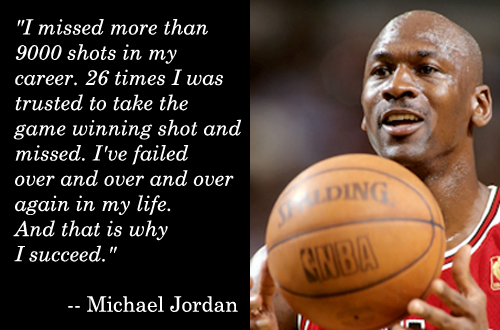
I don’t think that having students ask the teacher for every little step is setting them up for success on their own. I am aware that there are a portion of people that like it when people check in with them on every little step. teaching students that it is ok to take calculated risks (especially when you can edit -> undo) is a valuable way to learn. I really like the way Mr. B was getting them to understand that it's ok to try and not succeed at something.
 |
| things worked out pretty good for this guy |
As I mentioned earlier the students I observed were using PCs, they also were using photoshop which is not a program that I use in my classes. The subject matter is close to what I teach, but it is intriguing to see a new perspective on how to utilize technology in a very similar setting.
The following is the short version of the interview I had with Mr. B:
How often do you use technology in the classroom?
 |
| one of the students postcards |
What obstacles do you run into when trying to use technology in the classroom?
- Not every student has their own computer
- trying to keep students all on the same page
- alternatives if the internet goes down
- getting students to organize their files effectively
- getting tech support in a timely manner
What is your plan if the technology does not work as you expect it to?
- ALWAYS have a plan b, which may be a project that does not use technology, or does not have internet access
What types of technology do you use in your classroom and why?
 |
| a (fake) photo of the interview I had with Mr. B |
- photoshop
- (why) because the curriculum is based on these pieces of tech
How do you obtain devices for use in your classroom?
Do all of the teachers in your school use technology at the same level?
Do you think teaching with technology is helping students? why?
- yes, it's teaching them 21st century skills, teaching them to express their ideas in a new medium. it promotes creative exploration.
I’ve taken away quite a bit from my observation. I think the biggest point that has stuck with me is giving connections to the history of the “art” we teach. I’ve observed how some students con flourish when they make that connection to the past and how for others it gives them a more concrete idea of what they are going to do.
 |
Mr. B's portrait of me
(he made the mistake of telling me about this reddit on video game music and concentration) |
Also, while it was not an explicit part of what I observed, the class is offering to design logos for anyone in the school if they want them. I think this is a great way to advocate for getting more teachers on board with technology in the classroom.
In conclusion, Technology is vitally important in a school. If I personally allow myself to have a narrow view of what technology education in the classroom looks like, that will significantly limit my ability to teach technology moving forward. We are teaching students for jobs that don’t even exist yet, but making sure that they have a fundamental understanding of technology, how to utilize, and how it works it is imperative to their future success.
| Date |
Time |
Lesson Observed |
| 4-11-14 |
9:31-10:19 |
students were locating templates for postcards online, to use as a starting off point for their own work, on their own postcards. |
| 4-15-14 |
10:24-11:12 |
students used photoshop to create a text/image relationship and create a clear visual hierarchy in their post cards |
| 4-18-14 |
1:26-2:15 |
students had printed out their postcards and a class critique was held. Students gave feedback on their work. |
| 5-1-14 |
12:33-1:21 |
Students were doing research online about logos … finding a few that they like, and a few that that do not like. The class then discussed |
| 5-8-14 |
9:31-10:19 |
They are working on their logos (they have to make 10!) in photoshop. |
| 5-9-14 |
7:35-8:28 |
students continuing to work on their logos in photoshop … they were learning different tools in photoshop though out these two projects…. this one was specific towards image manipulation |